
An AR version of a familiar product is useful as a design exercise because it forces the interface to respond to the physical situation, not just reproduce the same screen in 3D.
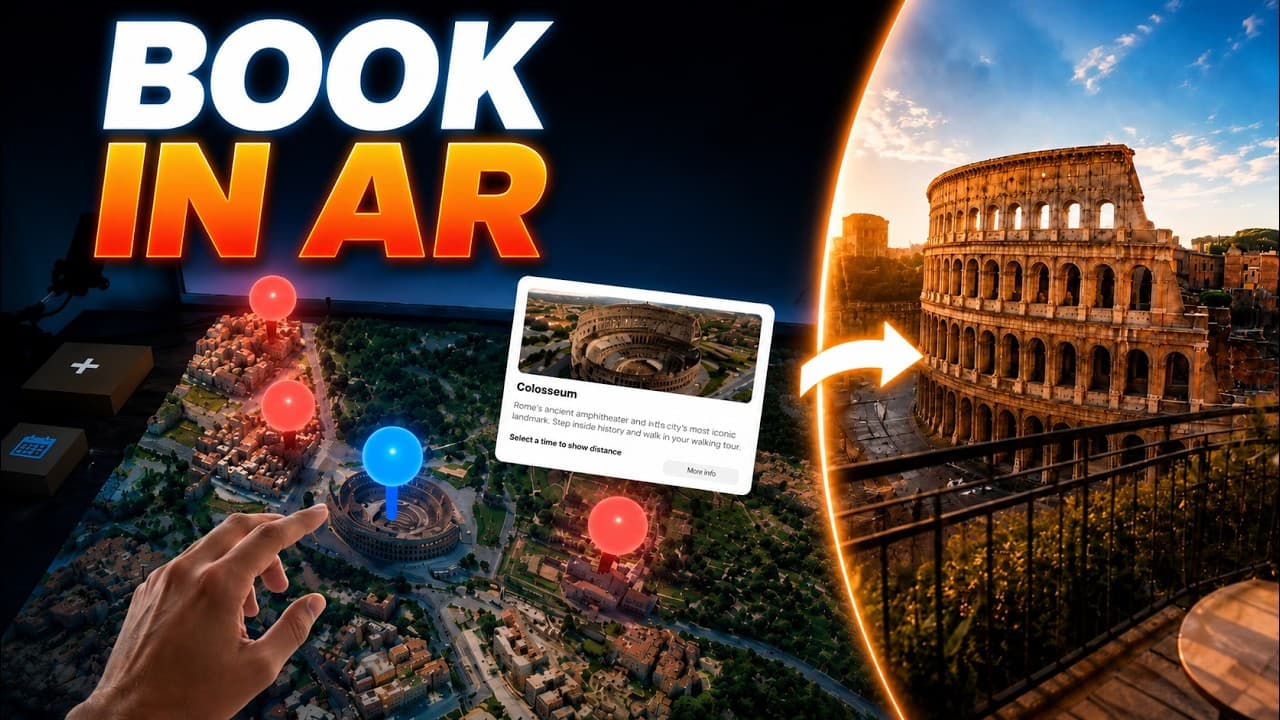
What if searching for your next Airbnb did not happen on a flat website, but directly in your room? Instead of scrolling through endless cards, you place a 3D map of Rome onto your table, tap on apartments, compare locations and then step inside an immersive preview of the place. That is the small WebXR prototype I built to test this idea.
The map becomes part of the interface
At the beginning, the app detects horizontal surfaces. When my hand gets close enough, the 3D map unfolds onto the desk. The city is no longer just a flat map. It feels a bit like a bird's-eye view or a small game board, and that makes exploring the locations more engaging immediately.
When I select a marker, a spatial preview card opens next to the map. From there, I can jump straight into an immersive preview of the apartment. Instead of only looking at photos, the user can enter a captured 3D view, look around and get a feeling for what it would be like to live there.
What AR can add to the decision
The prototype is built around one main app scene created with the free and open-source Immersive Web SDK. I used a Blender plugin called Blossom to import, manipulate and export the 3D map as a GLB. The map interactions use built-in SDK components such as ray and poke interactables, which makes this kind of WebXR scene quite quick to prototype.
For the apartment previews I used generated room images and turned them into immersive views with Marble Worlds. That is useful for testing the interaction, but it also shows the limitation clearly: generated scenes can hallucinate details that do not belong to the real apartment. For a real product, hosts would ideally capture their spaces with a proper 3D scanning workflow.
Why a prototype is valuable here
That is why I like building this kind of prototype before thinking about a full product. You can test whether the spatial layer actually helps or whether the good old 2D UI is more convenient. You can also find out which parts need real 3D capture and which parts can remain a lightweight preview.
The splats in the prototype are not perfect, and this is not a complete virtual room tour system. Even so, the simple version gives you a better feeling for the space, atmosphere and mood than a normal image carousel. Personally, I would love to have that feature inside apartment or hotel booking sites already.
The bigger question is whether people would rather book their next vacation in an immersive AR view or use the familiar 2D interface because it is more convenient. That is exactly the kind of question a small WebXR prototype can make tangible. You can try the idea, see where it breaks and decide whether the spatial version is actually better.